Notepad, Notebook, Notes app
- 4.3
- Rating
- 10.00M
- Installs
- Free
- Price
 Analysis by App-foxy
I tend to judge a notes app less by how many buttons it offers and more by what happens when I need to capture something quickly, find it later, or keep a private idea away from casual view. Notepad, Notebook, Notes app from Imagination AI takes a deliberately simple route: it is a free productivity app for writing notes, making to-do lists, locking ideas, and adjusting the look of the workspace. After using it as a lightweight digital notepad, I see its appeal clearly, but I also found that its simplicity creates some boundaries that matter before you move every important note into it.
The app has a 4.3 average from around 171 thousand ratings, with more than 10 million installs. That level of adoption makes it easier to take seriously as an everyday tool, although popularity alone does not tell me whether it is the right place for sensitive information. My review therefore focuses on the practical controls I could use inside the app, the moments where privacy matters most, and the situations where a more advanced notes platform would be a better fit.
What it feels like to use Notepad for everyday organization
I find the everyday appeal of Notepad in how little ceremony it asks of me: I can jot down a thought, turn a few errands into a list, and keep moving. That same simplicity makes a small bit of personal structure especially useful—consistent note titles can help me distinguish quick reminders from ideas I may want to revisit. Next, I’ll look at how that low-friction approach holds up when a day gets busy.
You May Also Like

 Blood Strike: 2.5 Anniversary
Blood Strike’s Loadouts Turn Every Drop Into a Tactical Gamble
A close look at Blood Strike’s custom loadouts: how fast access to signature weapons reshapes its battle royale rhythm, rewards preparation, and narrows the gap between fights.

 Pandora - Music & Podcasts
Pandora’s Music Is Easy to Start, but Harder to Recover
Pandora’s strength is its low-effort path from a seed to a station. Its weak spot is how much confidence it asks you to place in connection, setup, and quiet recovery.

 8 Ball Pool
 Is Built on Rivalries, Rematches, and Routine
A close look at the rivalries, rematches, shared routines, and unanswered safety questions that turn a quick pool match into a persistent mobile community.

 Samsung Music
’s Quiet Strength Is Playing What You Already Own
Its reach comes less from spectacle than from dependable access to a personal library. That simplicity is both the app’s strongest retention engine and its ceiling.

 AccuWeather: Weather Radar
AccuWeather Review: A Quick, Clear Forecast for Everyday Decisions
For everyday plans, the best forecast is the one you can understand quickly. AccuWeather makes rain timing, radar, and local conditions easy to act on, with a few trade-offs.

 Hill Climb Racing
Why Hill Climb Racing Still Turns Crashes Into One More Run
A tiny car, a bumpy hill and one more upgrade: Hill Climb Racing keeps resurfacing because its simple chaos makes every near-miss feel personal.
More From Our News Desk



A quick workspace for thoughts and small tasks
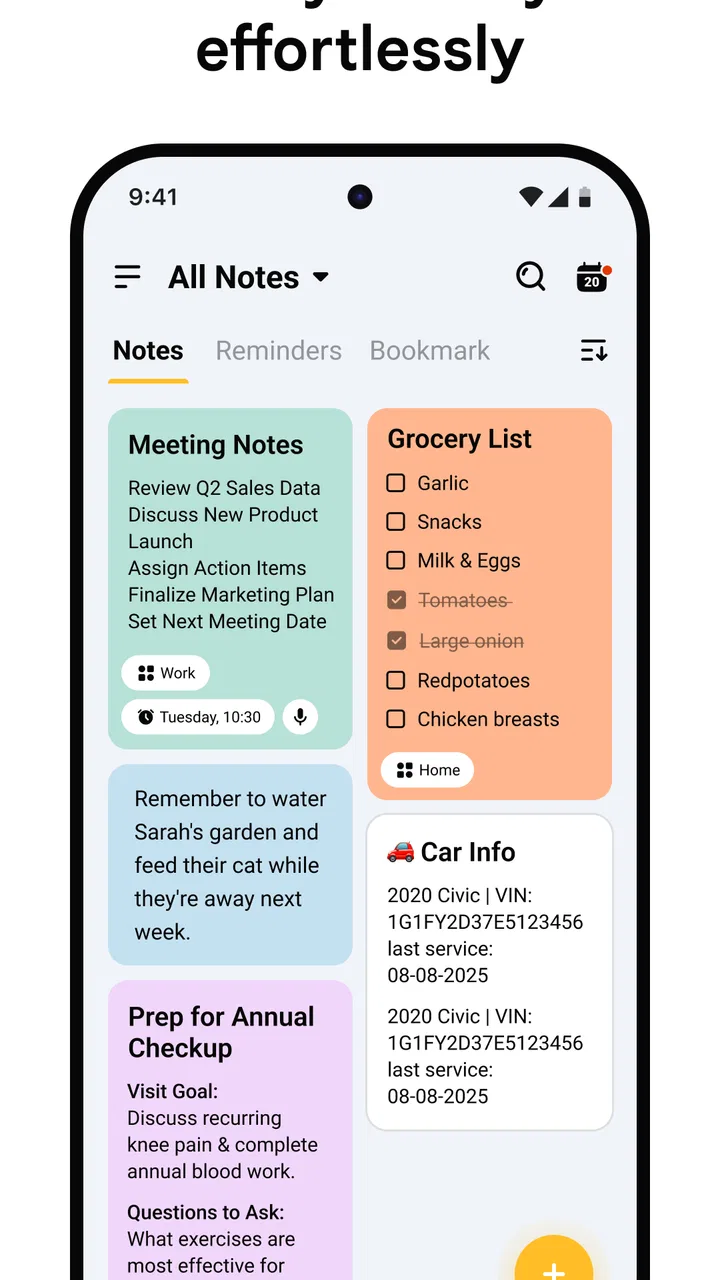
The strongest part of Notepad is the short distance between opening it and writing. I can treat it like a pocket scratchpad for a shopping reminder, a phone number I need temporarily, a rough plan for the day, or a thought that would otherwise disappear. That makes it more approachable than a full office-style note system, especially when I do not want to decide on folders, tags, formatting, or a complicated filing method before writing.
Its productivity focus is broad rather than specialized. I can use one note for a short paragraph and another as a checklist, which covers the basic rhythm of personal organization: capture first, act later. The to-do-list side is particularly useful for errands and small routines because it keeps a task list separate from longer notes without forcing me into a dedicated project-management workflow.
I would recommend it to someone who wants a straightforward place for reminders and personal writing, not to someone looking for a complete knowledge base. The difference is important. A simple note is excellent when the main challenge is remembering something. It becomes less suitable when the main challenge is connecting dozens of documents, tracking revisions, or coordinating work with other people.
A realistic day with the app
My most natural use case is a busy morning before leaving home. I can create a short list for groceries, add a few unrelated thoughts in a separate note, and keep a draft message or idea available without opening a larger productivity suite. Later, I can return to the list and mark items as I finish them. This kind of workflow sounds modest, but it is exactly where a notepad earns its place: repeated, low-friction actions rather than elaborate planning sessions.
For a student, the same approach works for a quick lecture outline or a list of questions to research. For a freelancer, it can hold a temporary call summary or a sequence of tasks for the afternoon. For a family, it can serve as a shared-looking personal reminder space, although I would not assume that it supports collaboration just because notes can be created and edited. If several people must work on the same content, a purpose-built collaborative service is safer as a choice.
Where the simple design helps and where it stops
Compared with a paper notebook, the app is easier to revise and less likely to be misplaced with yesterday’s receipts. Compared with a large cloud notes service, it feels less demanding because I am not entering a system built around documents, databases, or extensive formatting. That is a real advantage for quick capture.
The trade-off is that a lightweight notepad can become messy once every kind of information goes into it. If I store recipes, study material, work planning, travel details, and private drafts together, finding the right item may require more discipline than the app itself provides. I would use a naming habit from the beginning, such as starting notes with a clear subject, rather than waiting until the list becomes crowded.
This is also why I would not replace a dedicated task manager with it for a large project. A task manager is better when due dates, recurring work, priorities, reminders, or multiple stages are central to the job. Notepad makes more sense when I need a flexible list that I can update manually and understand at a glance.
Locking ideas without confusing privacy with security
The ability to lock ideas is one of the more meaningful features for personal use. I can see why it matters for a private journal entry, an early creative concept, a personal plan, or a note that would be awkward for someone else to read if they briefly handled my phone. It adds a deliberate checkpoint between ordinary notes and content I want to treat more carefully.
Still, I would use the lock as a practical privacy barrier, not as a reason to store every highly confidential record in the app. A lock can reduce casual access, but it does not automatically answer every question about storage, recovery, backups, screenshots, device compromise, or what happens if I forget the access method. For passwords, identity documents, financial records, or sensitive business material, I would choose a service designed specifically for secure storage and account recovery.
My useful habit here is to separate information by consequence. A private poem or personal reflection is one thing; a recovery code or client contract is another. The first may be appropriate for a locked note. The second deserves a tool whose security model is clearly built around that level of risk.
Customization that supports recognition rather than decoration
The option to customize the notepad is helpful when it makes the workspace easier for me to recognize and use. A personal visual arrangement can make the app feel less like a generic text box and more like a familiar place for quick entries. I prefer customization when it improves orientation—helping me distinguish a task area from a writing area—rather than when it simply adds visual noise.
I would keep the appearance restrained if I were using the app heavily. A bright or busy design may be pleasant at first but can make repeated reading less comfortable. The best setup is the one that lets the words and checklists remain the focus. Customization is therefore a supporting feature, not the main reason I would install this app.
Trust begins with visible choices
Because this app is intended for notes, I pay attention to moments where I am asked to make a choice: whether to lock an idea, whether to keep a note, whether to remove it, and whether an optional purchase is worth considering. Those visible decisions matter more to me than broad claims about being secure or private. I want to understand what I am doing before placing personal writing into any app.
Notepad is free to download and use, while in-app purchases are listed from $2.99 to $49.99 per item. That means I would check the purchase screen carefully before confirming anything, especially if I only need the basic notepad experience. A free starting point is useful, but the presence of optional purchases means I would not assume every extra capability is included without reviewing the choices shown in the app.
The developer is Imagination AI, and the app is rated for Everyone. Those details make it approachable for a broad audience, but an age rating is not a substitute for personal judgment about what to write in a note. Parents, students, and anyone sharing a device should still establish their own rules for private content and purchases.
Data-sensitive moments deserve a slower decision
The most sensitive moment is obvious: pressing save after writing something personal. A note can begin as a harmless reminder and gradually turn into a record of routines, locations, relationships, health concerns, or work information. I try to pause before adding details that would create trouble if exposed, especially when a simple reminder would do.
A second sensitive moment is using the lock. I would test it with an unimportant note first, confirm how unlocking feels, and make sure I understand what access method the app expects. That small test is more useful than locking an irreplaceable journal immediately. It also helps reveal whether the feature fits my habits or becomes an obstacle every time I need to edit something.
A third moment is moving between devices or reinstalling the app. For important notes, I would keep a separate copy in a place I already trust rather than assuming that every note-taking app will restore everything automatically. This is not a criticism of Notepad specifically; it is a sensible rule for any lightweight notes tool when losing a note would matter.
I would also avoid treating a note as a secure sharing channel. If I need to send private information to another person, I would use a communication method appropriate to the sensitivity of that information and delete temporary copies afterward. The app is useful for composing and organizing my own thoughts, but that does not make it a replacement for a secure document or messaging workflow.
How much control the user really has
Good user agency in a notes app means I can decide what to create, what to lock, what to edit, and what to remove without feeling pushed into a complicated system. Notepad’s basic concept supports that direct relationship. I can keep the app as a quiet personal tool instead of turning it into a second workplace.
At the same time, control also means knowing when not to depend on it. I would keep especially important information organized in a way that does not rely on one app alone. For a temporary list, that may simply mean rewriting the final result elsewhere. For a long-term journal, it may mean maintaining an intentional export or backup routine if the app provides a suitable way to do so. The key is to make that decision before the information becomes difficult to replace.
Another practical choice is how much structure to impose. I would create separate notes for separate purposes instead of placing an entire week into one giant page. Short titles, consistent wording, and occasional cleanup make a basic notepad much more useful. This is one of the app’s hidden trade-offs: it gives me freedom, but it also leaves much of the organization work to me.
Who should install it, and who should skip it
I think Notepad is a good match for people who want a free, approachable productivity app for quick notes and uncomplicated checklists. It suits someone moving away from paper, someone who wants a private place for casual ideas, or someone who finds larger note platforms distracting. The lock and customization options make it more personal than a bare text field.
I would be more cautious recommending it to a person who needs synchronized work across several devices, advanced search, document collaboration, formal backup controls, or a detailed project structure. In those cases, a mature cloud notebook, team workspace, or dedicated task manager may be worth the additional complexity. Likewise, anyone storing high-consequence secrets should choose a security-focused product rather than relying on a general-purpose notes app.
It is also not the best choice for someone who wants automatic organization. If I expect the app to sort years of notes for me, connect related ideas, or manage a large research archive, the simple approach may become frustrating. Its strength is intentional smallness, and that strength becomes a limitation when the job grows beyond quick capture and personal lists.
Device and version considerations
The app runs on Android starting with version 6.0, so it is accessible on a wide range of devices that are not using the newest operating system. The current version is 1.5.23, and I would keep the app updated through the normal store process when updates are available. Staying current is especially sensible for an app that holds personal writing, even though an update alone should never be treated as proof that sensitive data is fully protected.
Before making it my main notebook, I would perform a small trial: write a disposable note, create a checklist, try the customization controls, lock and unlock a non-sensitive idea, and remove the test content. That sequence answers the questions that matter in practice—whether the editing feels comfortable, whether the lock fits my routine, and whether cleanup is straightforward—without putting valuable information at risk.
My cautious recommendation
After using it, I see Notepad as a practical middle ground between paper and a feature-heavy digital notebook. It is easy to approach, flexible enough for everyday notes, and useful when I want a checklist or a more private idea kept behind a lock. The free entry point makes it simple to try, while the optional purchases mean I would review each paid choice rather than accepting it automatically.
My recommendation is positive for lightweight personal organization, with clear limits around sensitive data and advanced workflows. I would install it for shopping lists, quick drafts, daily reminders, and casual private writing. I would not make it the sole home for irreplaceable records, confidential work documents, passwords, or a complex project archive.
In the end, the app earns trust for me through the choices I can see and manage, not through assumptions. If I keep my notes proportionate to the tool, use the lock thoughtfully, maintain my own backup habits for anything important, and stay alert at purchase and privacy-related screens, Notepad can be a calm and useful companion. If I need stronger account controls, collaboration, or a clearly specialized security model, I would choose a different category of app instead.
FAQs for Notepad, Notebook, Notes app
01What is Notepad, Notebook, Notes, and what can I use it for?
Notepad, Notebook, Notes is a straightforward note-taking app designed for quickly writing, organizing, and reviewing information on a mobile device. During testing, it was useful for shopping lists, reminders, study notes, ideas, meeting details, and short personal entries. Its simple layout makes it suitable for everyday writing without the complexity of a full document editor.
02Does the app support organizing notes into categories or notebooks?
The app provides a practical way to keep notes organized rather than placing everything in one long list. Depending on the version installed, users may be able to create separate notebooks, categories, or labels and use titles to identify individual entries. This is especially helpful when managing school notes, work information, personal lists, and other content at the same time.
03Can I use Notepad, Notebook, Notes without an internet connection?
The core note-taking features generally work offline, allowing you to create, edit, and read saved notes without a mobile data connection or Wi-Fi. This makes the app convenient while traveling or in areas with poor reception. However, features such as cloud synchronization, online backup, sharing, advertisements, or account-related services may require internet access.
04Are my notes private and securely protected?
You should review the app’s privacy policy and the permissions requested on your particular Android or iOS device before storing sensitive information. Basic notes may be saved locally, but privacy protection can vary depending on whether synchronization, backups, or third-party services are enabled. Avoid entering passwords, banking details, or highly confidential data unless the app clearly provides encryption or note-locking features.
05Can I back up, synchronize, or share my notes with other devices?
The availability of backup and synchronization depends on the app version and the platform you are using. Some installations may support sharing notes through standard phone applications, while cloud synchronization or export options may require an account or additional settings. Before switching phones or deleting the app, confirm that your important notes have been exported or backed up successfully.
Pros
- Clean
- distraction-free interface for quick note-taking
- Supports organized notebooks for separating personal and work notes
- Fast search makes it easy to find saved information
- Useful for capturing ideas
- lists
- reminders
- and daily thoughts
- Lightweight design works smoothly on most Android and iOS devices
Cons
- Advanced formatting options may be limited for complex documents
- Large note collections can become difficult to organize over time
- Some features may require an internet connection or account access
- No dedicated tools for handwriting or detailed sketching
- Privacy options may not meet the needs of users storing sensitive data

Notepad, Notebook, Notes app
Gallery